Most bloggers think Pinterest rankings are decided entirely on Pinterest…
The perfect pin design. The right keywords. The right boards.
And those things matter. A lot.
But here's what most creators don't realize…
Some of the biggest signals Pinterest uses to rank your pins come from your own website.
What's on the page your pin links to. How long people stay there. Whether readers save your images to their own boards.
Pinterest is watching all of it.
And once you understand how your blog feeds Pinterest's ranking system, you can turn every post into something that helps your pins climb higher in search.
📋 Website Ranking Factors for Pinterest (Quick Reference)
Here are the ways your website can influence how your pins rank:
- Text Cohesion – Your page title, content, and image descriptions match your pin's topic
- Image Cohesion – Your pin image actually appears on the page it links to
- Saves From Your Site – Every save creates a new pin linking back to your post
- Long Clicks – Visitors who stay on your page 35+ seconds send a strong positive signal
- Board Context – The boards readers save your images to tell Pinterest what your content is about
- Freshness – New pins created from your site can benefit from Pinterest's freshness boost
- Image Descriptions – Keyword-rich descriptions give every saved pin strong signals from day one
How Pinterest Decides Which Pins Rank
Before we get into your website, let's quickly cover how Pinterest search works.
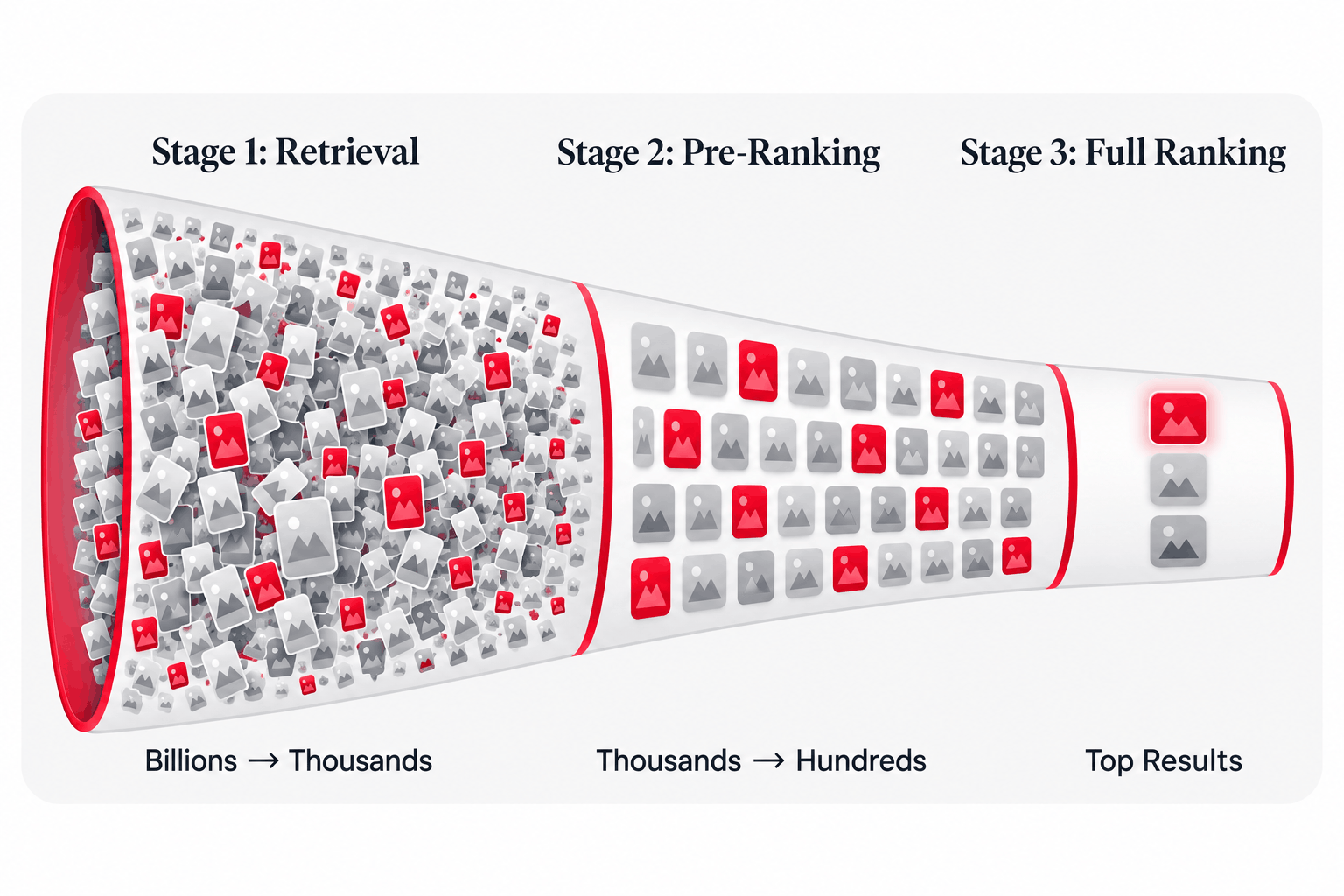
Think of it like a giant funnel with three stages.
Stage 1: The First Cut (Retrieval)
When someone searches, Pinterest narrows billions of pins down to a few thousand that might be relevant.
Stage 2: Quick Sorting (Pre-Ranking)
Pinterest takes those candidates and does a fast evaluation to find the most promising ones.
Stage 3: The Final Decision (Full Ranking)
The remaining pins go through Pinterest's main ranking system, called "Pinnability," which predicts how likely someone is to engage with each pin.
Here's where it gets interesting…
Many of the signals Pinterest uses at every stage don't come from the pin alone. They come from the page your pin links to and from how people interact with your content.
In other words, your website is part of your Pinterest SEO.
Topic Cohesion Starts on Your Website
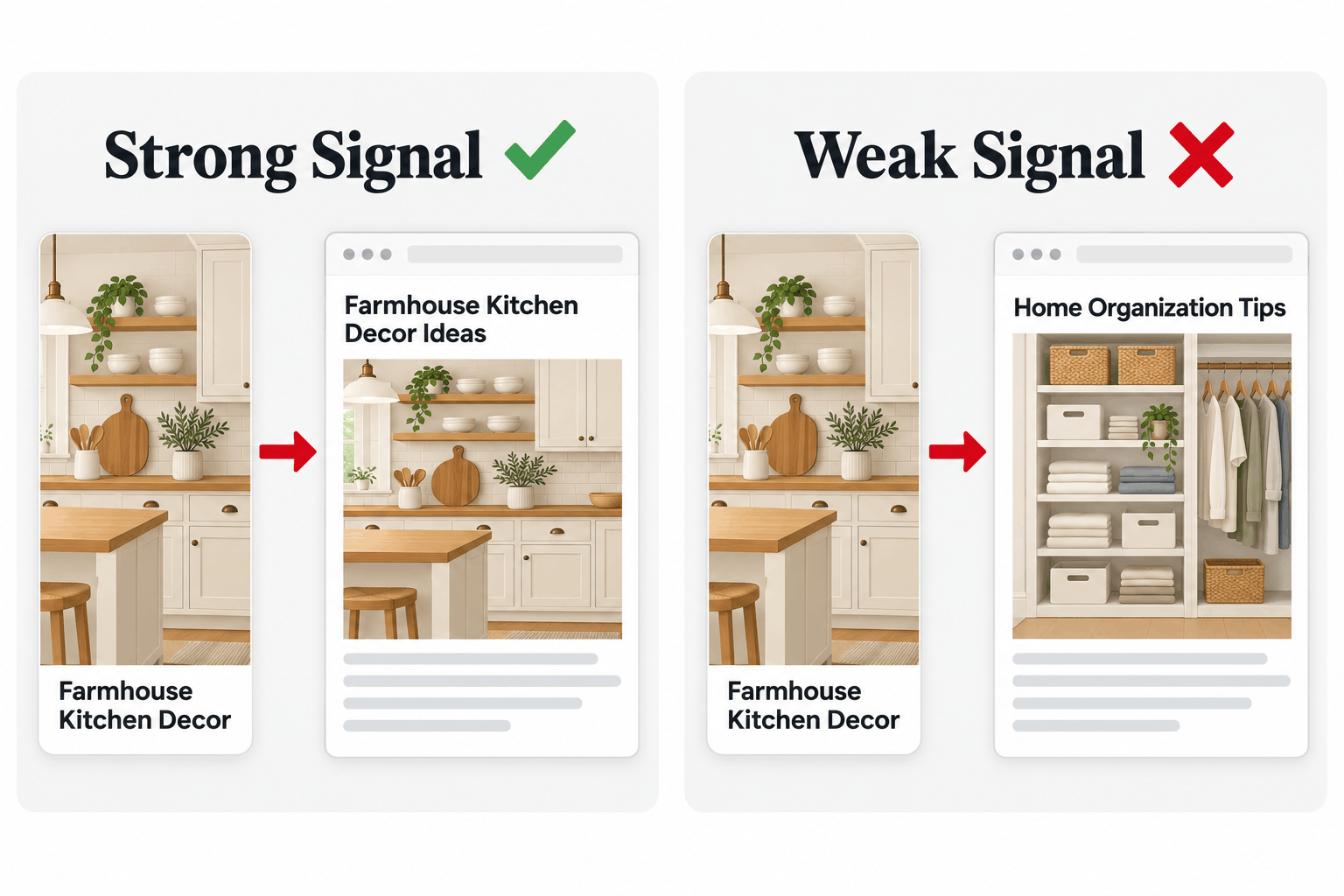
Pinterest uses something called "topic cohesion" to measure how well your pin matches the page it links to.
If your pin promises one thing and your page delivers something else, Pinterest notices. And it can cost you rankings, or even get your pin hidden from search results.
Pinterest checks cohesion in two ways:
Text Cohesion
Pinterest compares the keywords in your pin with the text on your webpage.
So your page needs to clearly be about the same topic as your pin. That means your:
- Page title
- Meta description
- Headings and content
- Image alt text and pin descriptions
For example, if your pin is about "farmhouse kitchen decor," your blog post should be about farmhouse kitchen decor. Not "home decor ideas." Not "kitchen organization."
Image Cohesion
This is the one most bloggers miss…
Pinterest also checks whether your pin image is similar to the images on the page you're linking to.
So if you design a beautiful pin and link it to a post where nothing looks anything like it, you're sending a weaker signal.
The fix is simple: put your pin image (or images that clearly match it) inside your blog post.
And when your pin image is on the page, it's not just helping cohesion. It's also an image readers can save, which brings us to the next factor…
Saves From Your Website: Free Pins That Help You Rank
Every time a reader saves an image from your blog, a brand new pin is created.
That pin links back to your post. It lands on the reader's board. And it tells Pinterest that a real person found your content worth keeping.
Saves are one of the highest-value signals Pinterest looks at. So the more saves your content gets, the stronger your content looks to the ranking system.
But here's the problem…
Many Pinterest plugins only show the pin button when someone hovers their mouse over an image. On a phone, there's no hover. So mobile readers, which for most bloggers is the majority of readers, may never see a way to save your images.
That's a lot of free pins you're leaving on the table.
How PinnerPress Helps
PinnerPress keeps pin buttons visible on every device, including mobile. It automatically adds them to all the images on your site, so every reader has an easy way to save your content.
You can also add image banners, like "Save this for later!", that overlay on your images and give readers an extra nudge to pin.
Board Context: Let Your Readers Build Your Neighborhoods
Pinterest works like a massive web connecting pins and boards.
When a pin is saved to a board, Pinterest treats that pin as related to everything else on the board. This creates "neighborhoods" of related content.
Now think about what happens when readers save from your website…
A reader saves your "Farmhouse Kitchen Decor" image to their board called "Dream Farmhouse Kitchen." Another reader saves it to "Kitchen Makeover Ideas." Another saves it to "Rustic Home Inspiration."
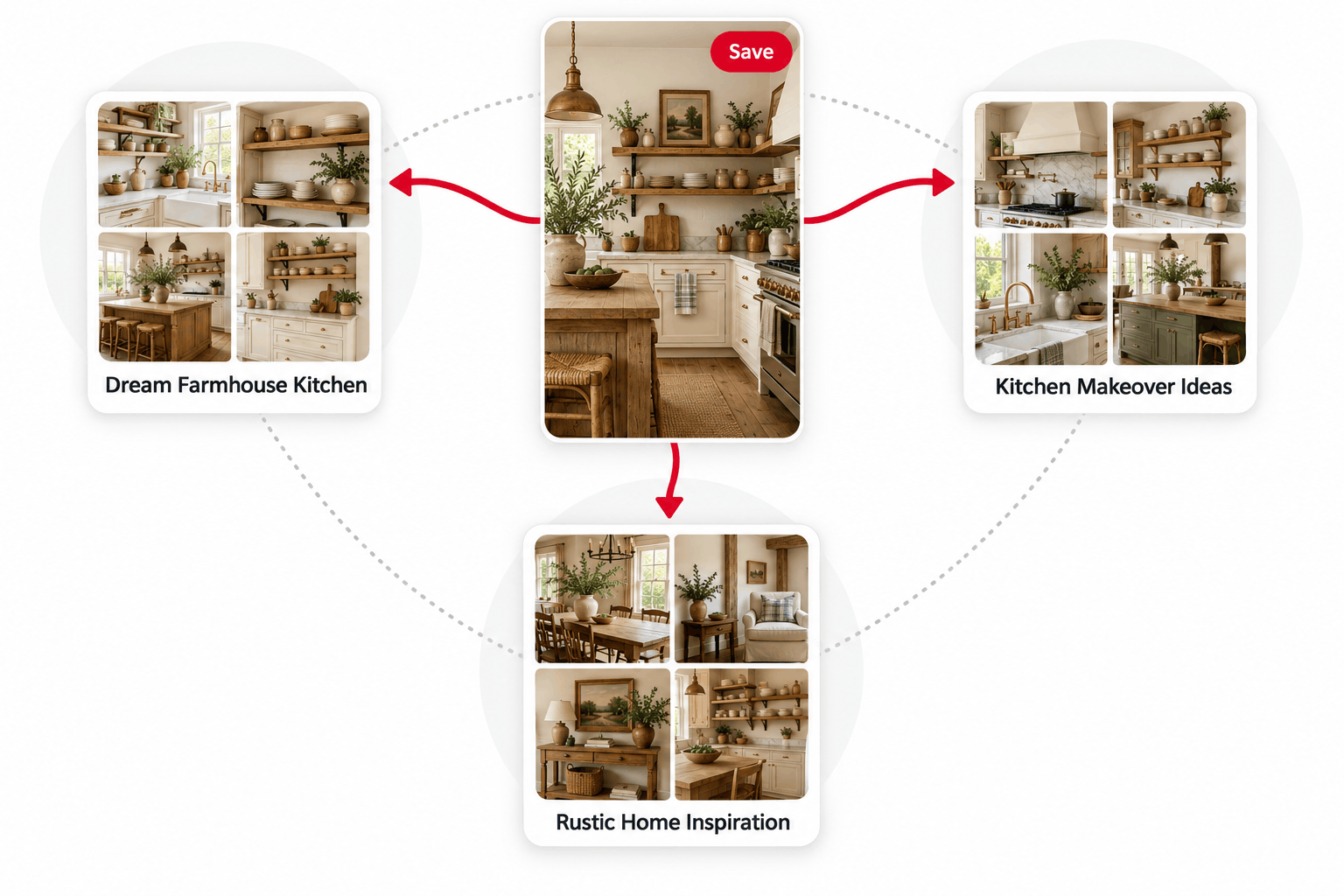
Each save places your content in a new neighborhood, giving Pinterest more context about what your post is about and who might be interested in it.
And you didn't have to create a single one of those pins yourself.
Image Descriptions: Give Every Saved Pin a Head Start
When someone saves an image from your website, Pinterest uses the description your site provides for that image.
So if that description is empty or generic, every pin created from your site starts with weak signals.
But if your descriptions use the official interest keywords Pinterest recognizes, every save becomes a well-optimized pin automatically.
Instead of a description like "kitchen ideas," use something more specific that matches how people search, like "farmhouse kitchen decor ideas with open shelving."
Here's where most bloggers mess up…
They write a great description for the pin they upload to Pinterest, then leave the images on their blog with no description at all. That means every reader save is a missed opportunity.
Long Clicks: Your Page Has to Deliver
Not all clicks are created equal…
Pinterest pays close attention to what happens after someone clicks your pin. Visitors who stay on your page for 35 seconds or more send a strong positive signal. Visitors who click and immediately leave send a weak one.
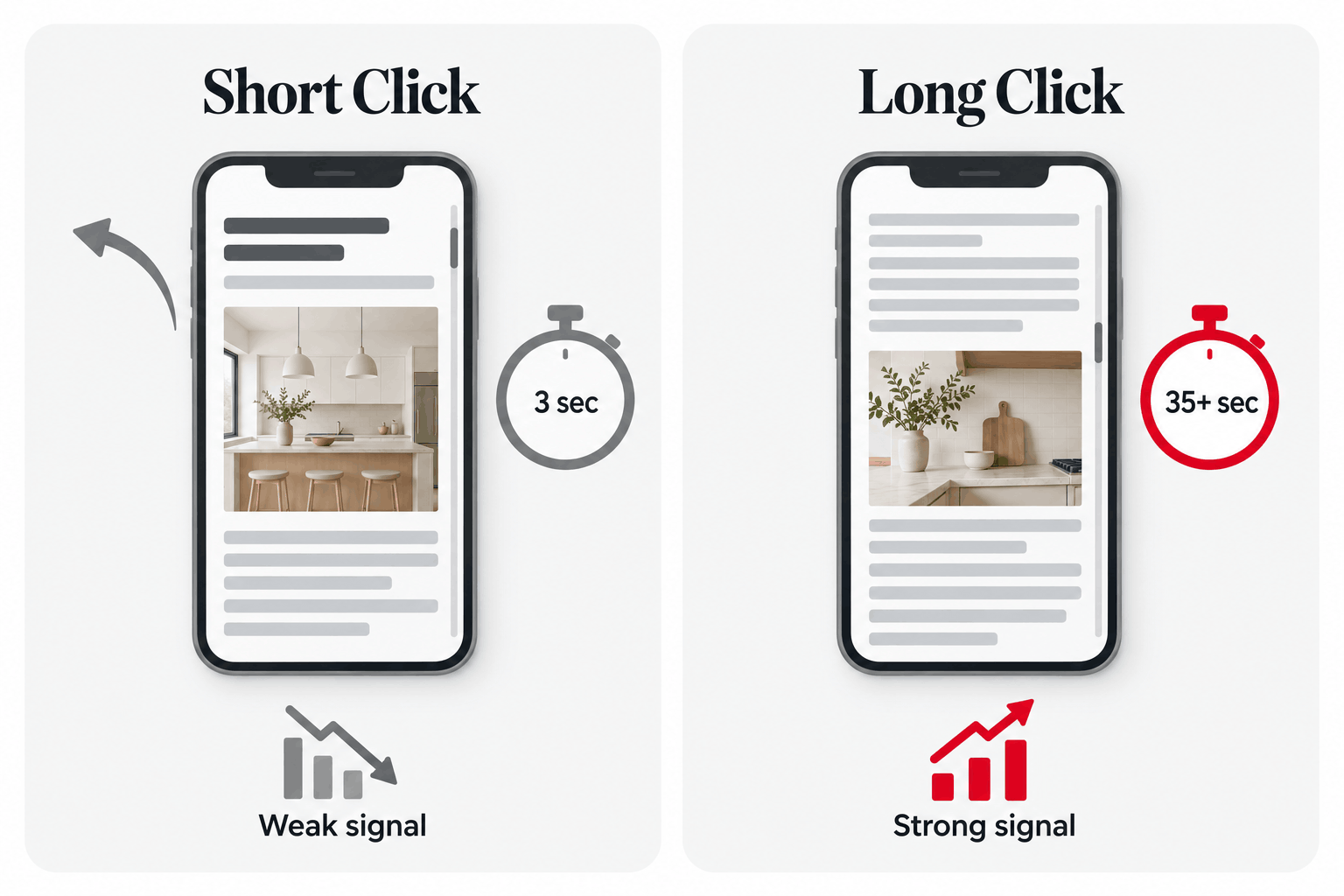
This means your blog post isn't just where Pinterest traffic ends up. It's part of how your pin gets ranked.
To earn more long clicks:
- Deliver what the pin promised, fast. If your pin says "25 Farmhouse Kitchen Ideas," make sure readers can see that's exactly what they landed on.
- Lead with your best images. Pinterest visitors are visual. Strong images near the top keep them scrolling.
- Make the page easy to read on mobile. Short paragraphs, clear headings, and images that load quickly.
The Freshness Factor
Pinterest actively promotes new content so older pins don't dominate search results forever.
Pins that are less than 7 days old can get a ranking boost, which is why consistent pinning matters so much.
Here's the part most bloggers don't think about…
When readers save images from your website, they're creating brand new pins. So a blog post that keeps getting saved can keep producing fresh pins, even when you haven't touched it in months.
Your best posts can quietly keep feeding Pinterest new content while you sleep.
Use Data to Find What's Working
Most bloggers have no idea which of their posts and images readers actually save.
So they guess.
PinnerPress tracks every pin button and banner click, so you can see:
- Which posts get the most saves
- Which posts have the lowest pin click-through rate (Pin CTR)
- Which individual images inside each post get saved the most
Use this data to swap out weak images, move your best images to the top of your posts, and create more pins like the ones your readers love most.
The images readers save on your website are often a great clue about which pin designs will perform well in Pinterest search too.
Putting It All Together: Your Website Pinterest SEO Checklist
✅ Before You Publish a Post
- Research official Pinterest keywords for your topic using PinClicks
- Use those keywords in your post title, meta description, and headings
- Add your pin image (or a matching image) inside the post
- Write keyword-rich descriptions for every image
- Make sure pin buttons are visible on mobile
- Make sure your post delivers exactly what your pin promises
📈 After You Publish
- Track which posts and images get saved the most
- Replace or improve images with low pin CTR
- Move your best-performing images near the top of the post
- Create new pins based on the images readers save most
The Bottom Line
Ranking on Pinterest isn't only about what happens on Pinterest.
Your website feeds the same signals Pinterest uses to decide which pins rise to the top: cohesion, saves, board context, long clicks, and freshness.
When your posts match your pins, your images are easy to save, and your descriptions speak Pinterest's language, your blog stops being just the place Pinterest traffic lands.
It becomes one of the reasons your pins rank in the first place.