Most bloggers think of Pinterest's algorithm as something that lives entirely on Pinterest…
A mysterious system that decides whether your pins get seen or get buried.
But here's what most creators don't realize…
Pinterest's algorithm is constantly looking at your website, too.
Your blog post titles. Your images. Your URLs. How people behave after they land on your page. Whether readers save your images to their boards.
All of it feeds the system that decides who sees your pins.
So in this guide, I'm going to walk you through how Pinterest's algorithm actually works, and more importantly, how your website plays a part in every single piece of it.
📋 Quick Reference: How Your Website Feeds Pinterest's Algorithm
What Pinterest's Algorithm Actually Is:
- A visual search engine, not a social media platform
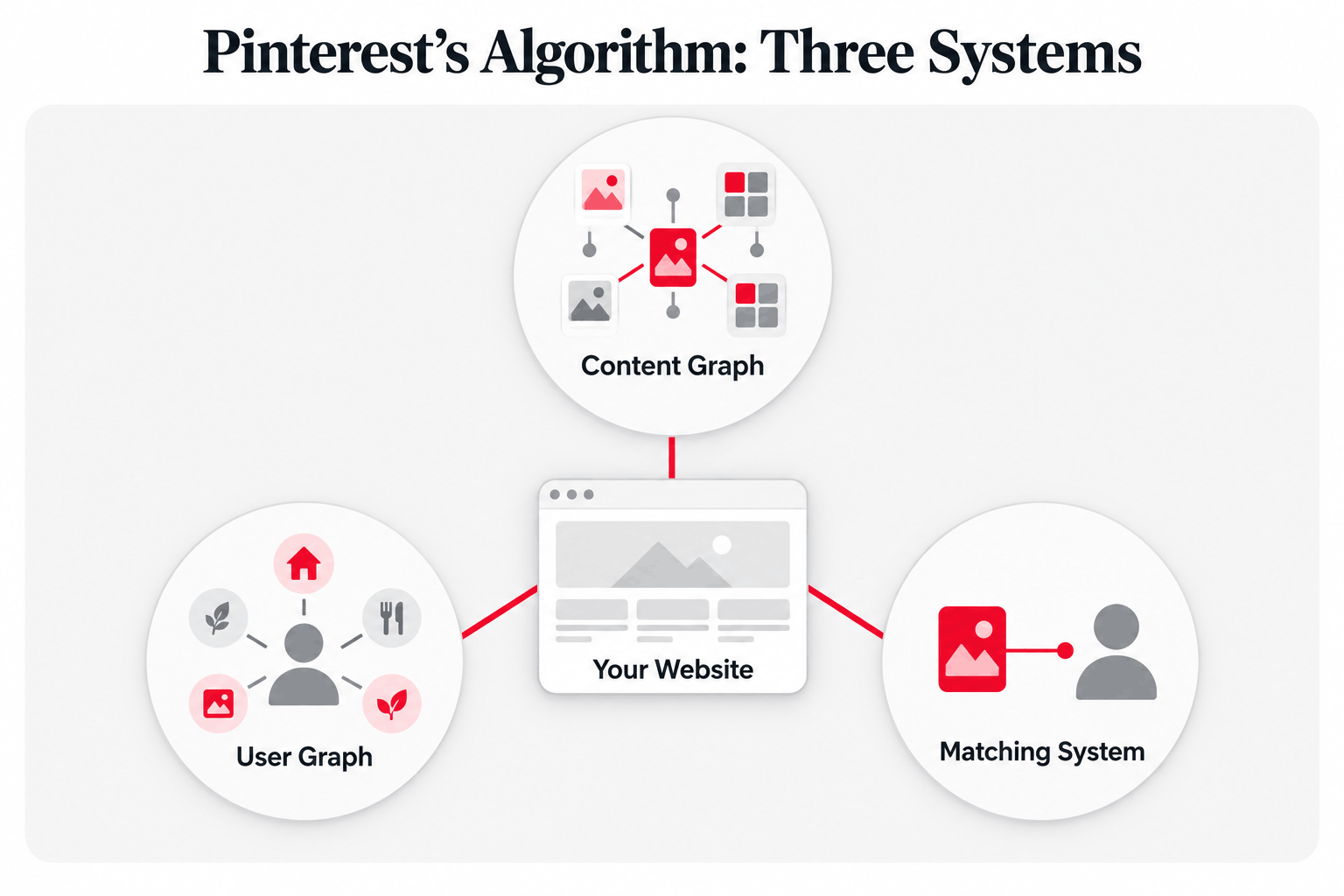
- Three systems working together: the Content Graph, the User Graph, and the Matching System
How Your Website Plays a Part:
- Your blog post's title, meta description, headings, and URL help Pinterest understand what your pins are about
- Saves from your website create new pins and new connections in Pinterest's content graph
- Your images can be recognized, grouped, and matched by Pinterest's visual systems
- What visitors do on your page sends engagement signals back to Pinterest
Your Website Optimization Priorities:
- Make your blog post match your pin's topic exactly
- Use Pinterest's official keywords on your page and in your image descriptions (You can find all of them on PinClicks)
- Use original, high-quality images
- Make saving your images easy on every device
- Give visitors a reason to stay
Pinterest's Algorithm Is Actually Three Systems
Most people think Pinterest has one algorithm.
But it's actually three systems working together:
1. The Content Graph
How Pinterest understands what your content is about
2. The User Graph
How Pinterest figures out what each person wants to see
3. The Matching System
How Pinterest decides which pins to show to which people
Your website touches all three.
Let me break down each one…
Part 1: The Content Graph (How Pinterest Understands Your Content)
Pinterest sees its platform as a massive web of connections between pins and boards.
Every time someone saves a pin to a board, Pinterest learns something new about how topics relate to each other.
Think of it like this…
If lots of readers save your "easy chicken recipes" image to boards called "Weeknight Dinners," "Family Meals," and "Quick Cooking," Pinterest learns that your content belongs in that neighborhood.
Your Website Creates New Connections
Here's where your website comes in…
Every time a reader saves an image from your blog, a brand new pin is created, and a brand new connection is added to the content graph.
That's one more board, one more topic signal, and one more pathway back to your post.
The more easily readers can save your images, the more connections your content builds.
Pinterest Reads Your Blog Post, Too
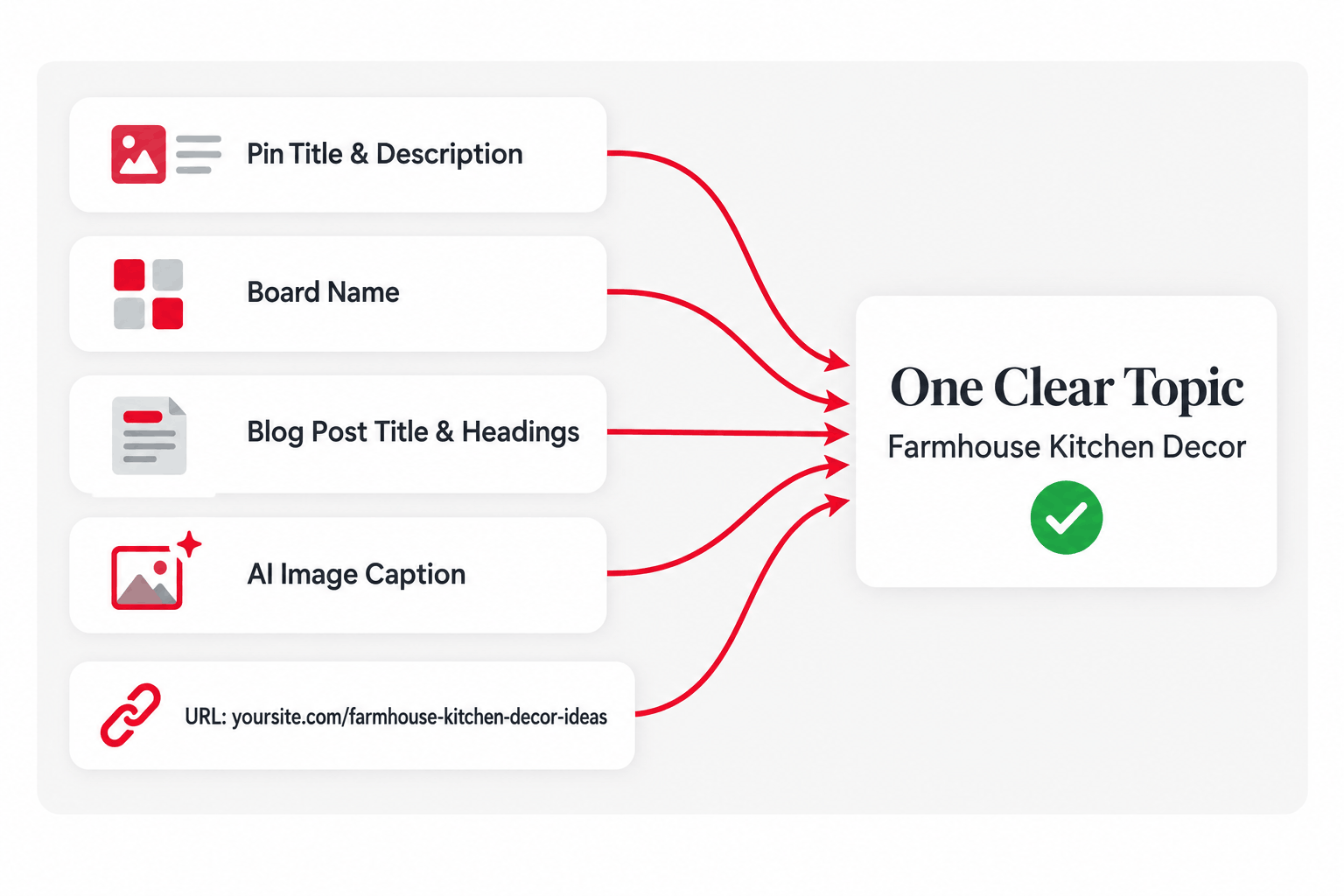
Pinterest doesn't just look at your pin description to understand your content. It looks at multiple text sources, including:
- Your pin title and description
- The board name where it's saved
- Your blog post's title, meta description, and headings
- Image captions generated by AI
- Your URL structure
That last one surprises a lot of bloggers…
A URL like yoursite.com/farmhouse-kitchen-decor-ideas tells Pinterest a lot more than yoursite.com/p=4821.
The more these signals point to the same topic, the better Pinterest understands what your content is about.
Topic Cohesion: Why Your Blog Post Matters
Pinterest measures how well your pin matches your blog post using something called a "topic cohesion score."
If your pin is about "meal prep ideas" but your blog post is really about "budget grocery shopping," Pinterest notices.
Low cohesion can hurt your pin's performance. High cohesion can help it.
Part 2: The User Graph (How Pinterest Understands People)
Pinterest builds detailed profiles of each user's interests.
But it doesn't see people as having just one interest. It recognizes multiple, separate interest clusters.
For example, one person might be interested in:
- Minimalist home decor
- Keto recipes
- Travel photography
- DIY crafts
Pinterest tracks each of these separately and shows content that matches each one.
Pinterest also pays attention to what people are doing right now. If someone just searched for "summer salad recipes," they'll start seeing more food content, even if they usually look at home decor.
What This Means for Your Website
Here's the part most bloggers miss…
When a reader saves an image from your blog, that save becomes part of their interest profile.
So every save from your website doesn't just help your content. It helps Pinterest connect your content to people with that same interest cluster.
And the more specific your posts are, the better Pinterest can match them to the right people.
A post about "budget meal prep for busy moms" gives Pinterest a much clearer signal than a post about "meal prep."
Part 3: The Matching System (How Pinterest Decides What to Show)
This is where everything comes together.
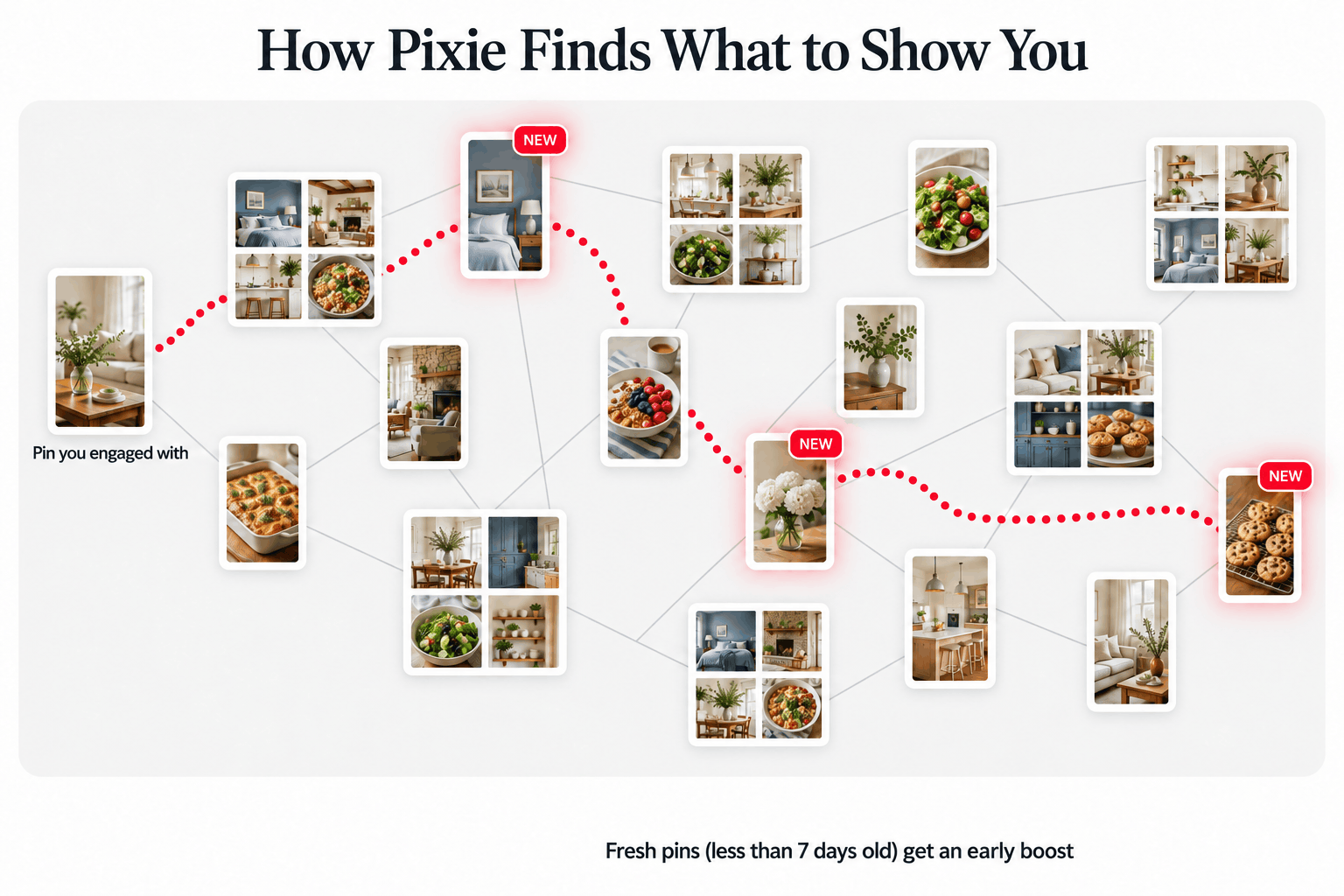
Pinterest uses a system called Pixie to generate recommendations.
When someone opens Pinterest, Pixie starts with pins they recently engaged with and "walks" through the content graph to find related content.
It's like following a trail of breadcrumbs through related pins and boards.
Here's what's interesting…
Pixie specifically looks for fresh content (pins less than 7 days old) when it explores these connections. That's why new pins often get an early boost.
Your Website Can Keep Creating Fresh Pins
When readers save images from your blog, they create brand new pins.
So a popular blog post can keep producing fresh pins over and over, long after you published it.
That means your website can keep feeding Pixie new content without you designing a single extra pin.
The Engagement Signals That Matter
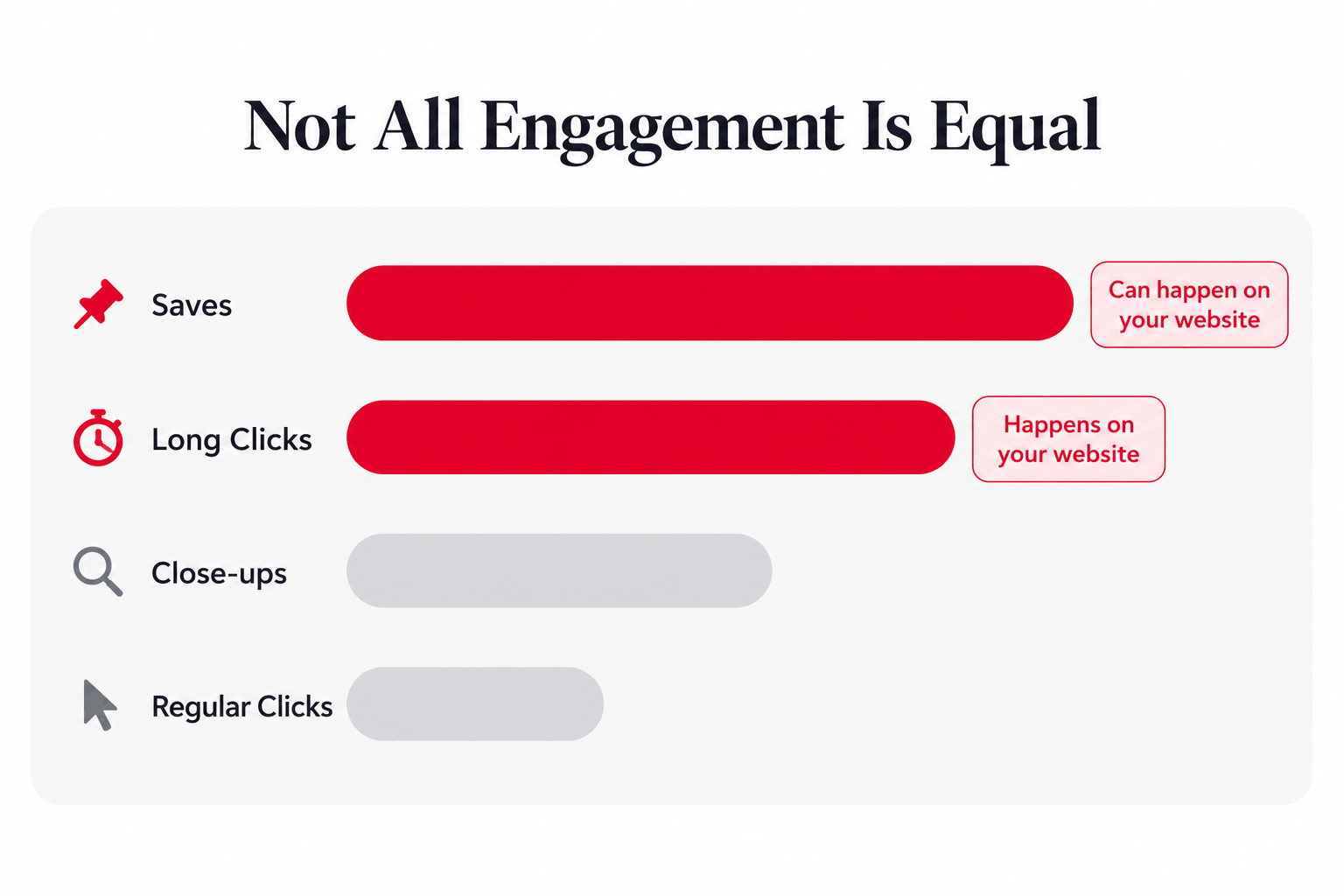
Pinterest tracks several kinds of engagement, but they're not all equal:
Saves
The strongest positive signal. A save tells Pinterest your content is worth keeping.
Long Clicks
Clicks where visitors stay on your page 35 seconds or more. These show real interest.
Regular Clicks
Important, but they can be misleading. Clickbait gets clicks, but not saves.
Close-ups
When someone taps to see a pin larger. This shows visual interest.
Notice that two of the strongest signals depend on your website.
Long clicks happen on your page. And saves can happen right on your page, too, if your readers have an easy way to pin your images.
How Pinterest Sees Your Images
Pinterest uses advanced computer vision to understand images.
It can identify objects, colors, and styles, and it can even spot near-duplicate images.
Why Original Images Matter
If multiple pins use the same image, Pinterest groups them together and typically favors the original or best-performing version.
So if your blog uses the same stock photos as hundreds of other sites, your pins can get lost in the crowd.
Original photos and graphics on your website help your content stand out, both on your page and on Pinterest.
Object Detection Can Bring You New Traffic
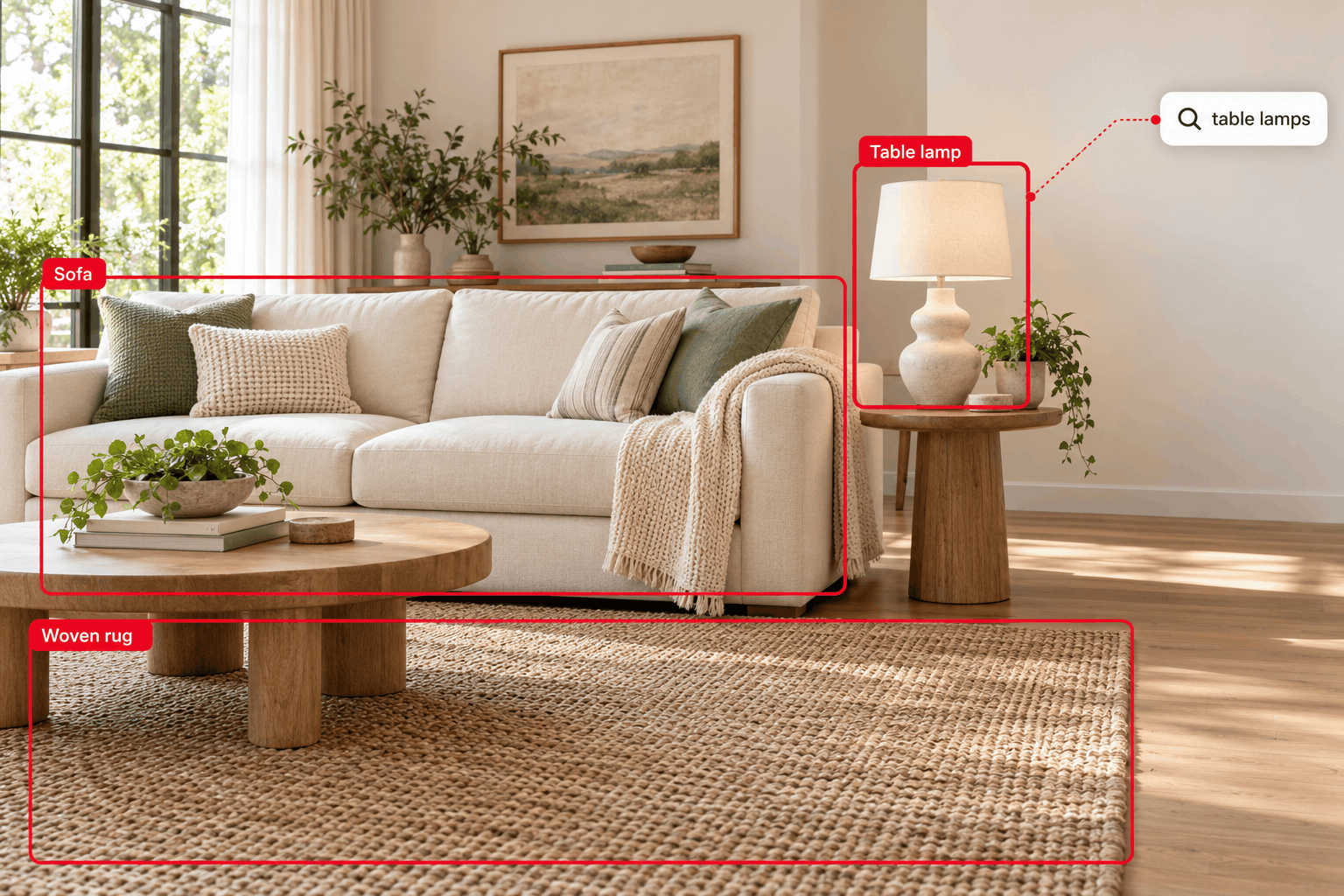
Pinterest can recognize specific objects inside your images and show your content to people searching for those things.
For example, if your blog post includes a photo of a living room with a specific lamp, someone searching for "table lamps" might discover your post.
This is why clear, well-lit, high-quality images on your blog matter. The easier it is for Pinterest to recognize what's in your image, the more searches it can match your content to.
Actionable Strategies for Your Website
1. Make Every Image Easy to Save
Saves are the strongest signal in Pinterest's algorithm, so make saving effortless.
Many Pinterest plugins only show the pin button when someone hovers their mouse over an image. On a phone, there's no hover, so many mobile readers never see a way to save your images.
PinnerPress keeps pin buttons visible on every device, including mobile, and adds them to every image on your site automatically. You can also add image banners that encourage readers to save.
2. Speak Pinterest's Language on Your Page
Use PinClicks to find official Pinterest interest keywords, then use them in:
- Your blog post title and headings
- Your meta description
- Your URL
- Your image descriptions and alt text
3. Keep Your Pin and Post Perfectly Aligned
Your pin should accurately represent what readers will find on your page.
The stronger the match, the higher your cohesion score.
4. Use Original, High-Quality Images
Use your own photos and graphics whenever possible, and make sure they're clear enough for Pinterest's visual systems to recognize what's in them.
5. Give Visitors a Reason to Stay
Long clicks happen on your website. So deliver on your pin's promise right away, lead with your best images, and keep your page easy to read on mobile.
6. Use Data to Find Your Best Images
PinnerPress tracks every pin button and banner click, so you can see which posts and images your readers save the most, and which ones need improvement.
Move your most-saved images near the top of your posts, replace images that get ignored, and use your top performers as inspiration for new pin designs.
The Bottom Line
Pinterest's algorithm is sophisticated, but it's not mysterious.
And it doesn't stop at the edge of Pinterest.
Your website helps Pinterest understand your content, build connections in its content graph, match your posts to the right people, and measure whether your content is worth showing.
The creators who win on Pinterest:
- Make their blog posts match their pins
- Use Pinterest's official vocabulary on their pages
- Use original, high-quality images
- Make saving their images easy on every device
- Give visitors a reason to stay
When your website works with Pinterest's algorithm instead of against it, every post becomes a source of new pins, new connections, and new traffic.
You just need to speak its language.